Showing posts with label how to. Show all posts

Inspiration & technique: composition

I found some well composed shots on flickr from a London photographer : InvernoDreaming. 

I don't thing he is a professional photographer, therefore I believe he is a great example of what any amateur could achieve by working on composition instead of taking vulgar nudes, kittens or gross HDR corny landscapes. 

Indeed, he does a pretty good job at getting a beautiful well composed image out of what would appear as a boring subject to most people. These are the hardest one to get. Look at those.


Now if that gives you an itch and you feel like improving at composition, keep a few things in mind:


  • Rule of third: balancing object so that they divide your image in thirds rather that in half. Horizon line, end of building, eyes of a person. It's not mandatory but should somehow part of your reflexion.


  • Think of depth: if your farthest objects are as sharp as your foreground, they will project flat an participate in the composition in a totally different manner. Thing about your aperture and depth of field, try to project what you see in the frame into a flat image, see how things will be balanced. Maybe some things need to be in focus to participate to the composition, maybe not. On this next one I kept everything in focus to use wall & furnitures lines as part of the composition (bed wood, cabinet, wall line).

  • How about diagonals? They can be obvious or linked to perspective, creates lines that give a sense of direction, create lines that balance objects across the image (as on the first picture of this post)

  • And symmetric stuff? Use symetric stuff !


  • F@$#% everything I just wrote :) Go for weird against the rules things, like on this picture.
    • Somewhat split in thirds (ground, trees& sky / also subject on the right third looking left)
    • But also in half, with a person's head way in the wrong place, and background focus

Basic tips for shooting and editing landscape

Today I'll give you a bunch of tips that should allow beginners to greatly improve on their lanscape photography. From there, you should be able to experiment and grow you own skills. I'll cover:
  1. Some very basic framing tips (I'll leave advance composition up to you, that's where the fun is)
  2. How to set up your camera properly to limit the need for editing afterwards
  3. How to edit, because a digital camera is collecting information, it need editing, the digital equivalent of development

I'll use the photos of Tom Grubbe, because he is totally amazing at it, and I suck (I'm a portrait photographer) 

Your goal. From amazing landscape photographer Tom Grubbe.


Framing
Proper framing should draw attention to the subject, put it in context, a create a sensation of "dimension" (call is distance, or multiple plans). An other key element of framing is that the brain extrapolates, sees directions, guesses what's cropped. It's often easy even for an amateur to say "it's poorly framed", or "it's great", but it's harder to actually explain why. 
  • Use the rule of third. A picture can be composed in third, as in the following example. Elements, horizon line , you don't need to have anything split in thirds, but some key parts should, to give proper balance.
Courtesy of dpexperience.com
  • Use elements that are in different plans to create depth. Front elements should be either on the side, or surrounding the center, of in front but of centered to the left or right, not in the middle. You can then have a middle element that can occupy an other third.
Tom Grubbe.
  • Use geometric shapes at your advantage: highlight a escape route, use diagonal lines to lead the eye.
Tom Grubbe again: see of the tree on the left follow by the fence fadding away are perfect examples of the 2 previous points.
Using shapes and geometry (and arrows) to lead to a escape point. This one's by me. 


Set up your camera properly
The big issue for landscape is exposure: it's very unlikely that every element in the shot is receiving or emitting the same amount of light. You already know what I'm talking about: ground element look ok but sky is plain white? Snowy mountains not showing well because they are too bright compared to the rest?Rings a bell? You bet it does. 
What's supposed to help you solve that is proper metering of light, therefore exposure, and dynamic range. The first one is simple: how well did you measure the average amount of light (this way everything is pretty much being exposed properly), the second one is how much you camera can capture huge light variations around that middle point. The higher the dynamic range, the more you camera can capture both dark and bright zones properly. HDR? It means hight dynamic range, it consist it faking better dynamic range by merge 2 or more images. It was essentially invented to compensate a weakness of digital cameras over film: film has fantastic dynamic range.

- Metering: set your camera to matrix metering, this way it will measure light across the entire frame and average it properly.

matrix metering mode is this one, looks the same on every camera. 


- Dynamic range: if you have a modern camera, use the dynamic range functionality. If you don't, you can use filters. You can screw them in front of your lens, and the top part will be filtering light, so that your skies come out blue and detailed, instead of plain white.

- Aperture
Finally, how do you make sure your entire landscape is sharp, both foreground and background? In order to do so, you must shoot with very low aperture (the f.number thingy on your lens). Prefer f8 and above. It reduced the amount of light going thru the lens, so you need to have a slower shutter speed, which lead to more of the image being sharp. The opposite works for portraits. 
That leads us to the one accessory you MUST have for landscape: a tripod. Even a super small cheap one, just anything that allow having a camera steady. Why? because if you open at f11, f16, you'll need a bright sunny day to shoot handheld. Anything other light condition, and the slow shutter speed will make your image blurry. Use a pod.

Use the maximum resolution your camera has to offer, don't for 5MP to save memory card. Get a bigger card ! You didn't spend 500$ on that camera to use it at it's lowest resolution to save 20$ of memory card! (I witnessed that too many times)


Editing your pictures
No, using photoshop is no taboo. Not using photoshop doesn't make you a snob cool artist who's so good he doesn't need it. A digital image need processing, 99.9999% of the time. Why? Because it's your image, you can't let the camera decise for you, otherwise you're just a button pusher. 
What is editing for then? How many time did you find your landscape pictures were flat? Colorless? Misshaped? Ah ah, now I got your attention.

- Correcting distortion
landscape = wide angle lens = distortion. Luckily most editing software have lens profiles in them.They can recognize the lens and offer the right presets for distortion correction. Use it, it's great.

See how the Berlin wall (bottom ) is straight? on the original shot it was curving to the point that the shot was unusable.


- Use the histograms or levels function to adjust the dark and bright zones
This will allow you adjust dynamic range, and give more texture to your image, make it less flat. 


- Correct saturation
Playing with contrast impacts saturation. The more contrast you add, the more saturated your images, to the point that they look like a clown.

Explaining the basics: focal length, aperture, fix or zoom lenses.

You just bought an SLR and are very confused by the technical terms? The sales guy went through it really quick and to be honest, you don't feel empowered at all to make the right choice? They read what's next !


I will try to explain it in the most practical, simplest way possible.

First of all, a lens name is usually like this : 18-55mm f4.5-5.6 FX VR. Yeah chinese !
  • 18-55mm = focal length
  • f4,5-5,6 = aperture
  • FX VR= other features, less crucial though

Focal length 
...is "how much it zooms". The human eye focal length is about 33mm. Less than that, you camera will see wider than that, more it will be zooming compared to what you see. A 18-55mm lens goes from wide (18mm), for landscapes, to a little more than human (55mm) which is a good length for portraits. 

Fix or zoom?
Some time the lense is simply called "35mm" instead of "18-55mm". It means that it is a fix lens. Only one focal length. You can't zoom in or out with that, but it has a lot of key strengths: it is optimize for one thing so it usually performs best. It is also less complex hence cheaper, and finally it can shoot with less light due to aperture (keep on reading to cover that). Zoom lenses are more multipurpose, but image quality is a little under, it's pricier, and less performant in low light...but you can zoom in and out. Keep in mind: the large the zoom range, the worse the quality.

Aperture
Those funky "f" numbers. The number is a indication of how much the thing that blocks the light inside the lens can open. The more it can open, the more light can get it, the more you can shoot in low light. Seen stargate? The space door opens completely, that would be a perfect full aperture. 
Unfortunately, on a camera lens, it is hard to open that large. So the more you can open, the more expensive it gets. Keep in mind the f number is a ratio, so the lower it is, the bigger the aperture. For example, a large aperture lens would typically be f1.8 or f1.4. When F4.5 would be low aperture.

Fully close iris on the left, a perfect full aperture on the right, always can use a good sci-fi example !

  • For fix lenses, f1.8 is about standard, very wide would be f1.4 or less. 
  • For zoom lenses, you usually have a 2 apertures: one for the small focal length, one for the big one. For example, 18-55 f4.5-5.6 means that at 18mm, the lens can open up to f4.5, and at 55mm, is can open up to f5.6. Great zoom lenses usually have a constant aperture of F2.8, which is really good for a zoom, but those cost usually 1000$ and up.
Also large aperture (small f number) allows you to get those nice blur behind the subject.

Those other letters at the end (FX, VR, etc)
Those are not optical characteristics. They are features or version. For example, FX means the lens is for a full frame camera (if you need to read this article, I doubt you own a full frame camera). VR for Nikon means that it has stabilization against shaking, the name probably is different for every brand. 
G or D can mean that it's optimized for digital cameras, etc. These are not so important.

My personal must have, a 35mm fix f2.0 lens. Versatile, small, cheap.


Now what should you buy:
  • portrait: a fix lens, 50mm or 85mm or 105mm. F1.8 or less. 
  • landscape: fix or premium zoom, 14mm up to 28mm. f number is not so critical because you will shoot with a tripod, and use the low apertures anyway.
  • travel: a human eye type of fix lens (35mm) or a versatile zoom that goes from 18mm up to 55 or 85mm. 
Feel free to read the other articles here to see how to make the most of it !

Picking the correct natural light for portraits.

"Oh it's sunny ! let's go take pictures !"

...or let's not ?

What is actually good natural light? This short post should help you with some basics on light for photography.

Let's start from a well know studio habitant: the soft box. While shooting portraits with artificial light, the big issue is the directionality of light: because it comes from a narrow source and in straight line, it creates shadows. Now shadows can look cool and be created on purpose, but many time you wan't to avoid the black areas under the eyes and next to the nose, on the neck or even on your background. In order to diffuse the light, we use soft boxes. It forces the light to bounce inside the box and come out from a very large surface. Instead of a 2 square inches light source, you have a 1 square meter light source that doesn't even shoot light straight. The next two pictures speak for themselves:

Courtesy of weichongraphy.wordpress.com

Now one of the best ways to have a natural soft box is to use a window:
- with a light transparent white curtain if the sun directly hits the window (otherwise it is very directional and hard to expose between light and dark zones in the room).
- without curtains if the window is hit by non direct light or if it's rather cloudy. It will give some direction to the light and it will yet be quite even and smooth. See for yourselves:

Thanks to Ema, Mamiya RZ67 pro II F2.8

Now shooting outdoors. I find that a bright sunny day is actually a pain, unless you want to create that burning sun, strong shadow effect that suggest heat. I live in Ireland, and fortunately, the sun is only a myth here. Instead I have plenty of cloudy skies with very even light.

Boring? Yes it can be if you don't use depth of field & expose correctly. But if you pull those right, you can have very nice, soft images, as follows:

 Mamiya 645 1000s, 80mm (246$ online...)

 Nikon D80, 85mm @F1.8 


Last two are with the Mamiya 645 1000s too.

So don't be afraid of cloudy days. I find that the overal best case scenario is sun with some clouds. In other words, any average day :)

If you shoot in a very harsh sun light, don't hesitate shooting against the sun : you subject's face will be evenly lit, and if you spot meter (measure exposure) on his / her face, you'll have a nice back light effect like this:

Mamiya 645 1000S: I made sure Albin's face was not directly hit by the sun to avoid bad shadow. Ladies: the girl behind is his GF, don't even ask.

If they face the sun, they'll close their eyes, have ugly shadows on the face, yuk ! In that case, you might want to use your flash for some fill light.

Last but not least, you can do one cool thing with very strong sun light, this:


Nikon D80, 50mm F1.8 (100$ lens...)


On this picture, Deborah is in a park in Dublin 4, saturday afternoon, 2pm bright sun. So how come only her face is lit and the rest came black? Well that has to do with something call dynamic range, that I would describe as a camera's ability to restitute details in extreme bright or dark zones.
HDR for example is artificially made extreme dynamic range: you take a shot exposed on dark objects of the image, one shot exposed on bright objects, and you mix the two so everything is bright and details.
Well most digital cameras have a very poor dynamic range (film does much better). So if you measure the correct exposure on the brightest part, in that case her face, the rest will be far to dark to show at that exposure level. 

Now go and shoot stuff.


Editing color digital into black and white

Long time without a little "how to" post !

I was going thru Flickr today (please, don't upload your entire memory cards on flickr, be selective, you're only has good as your worse pictures), and saw tons of really funny looking digital B&Ws.

Some are obviously meant to be looking in some way, some are very poor attempt to get whatever effect (film? shoot film then). They often are the fruit of very bad underexposure do to people not using the curves on the camera, or often in line with bad strobist work.

First of all, a little irrelevant but worth mentioning: for the price of a SB 900 flash, you can get 2 Elinchrom flash units + pods + umbrellas, 400W each...just saying, if you want to get into strobist stuff, do it well. In that field equipment matters and you need power.

So I'll now assume you want to edit a correctly exposed color shot. Most people desaturate, and that's it. Could work, it's one type of B&W but it's likely not going to work the way you want, since it'd pure luck if it did.

Why that?

Well the reason B&W film works so well is that it never knows what a color is. It gets amounts of light, period. No translation from red to gray. When you make a color shot B&W, with Photoshop, you have to take into account that red and blue, at the same light intensity, don't feel the same. Also it happens that blue is the sky, red is the main component of the skin...so messing up your B&W conversion could be like exposing poorly. With film, you use filters on the lens to cheat that. With digital, good news, you can shoot then think.

Examples in line:
This is the raw file saved as a JPG, no editing.


This is the "portrait" BW setting in photoshop: see how it takes colors into account. The blond hair look nearly darker than the back ground, though it's not at all how you feel when looking at the original file. Maybe this portrait deserves a different treatment? Let's try...


This is the "scenic landscape" settings. Notice that whatever the software and whatever it's called, you can reproduced those setting as they look on the screen shot. In that case blue intensity is much lower, hence the blueish background looks darker than the hair. I find that the model now stands out, shines, the picture has a stronger feel. Let's see if we can push that even further...


 Now I used the Infra red setting, meant to look like it's an actual infrared shot. We got a stronger "Harcourt studio" effect. That's the one I opted for, though I just lowered the gap between green a blue a little to avoid it looking too much like Infra red.

The fact is, you'll never have one preset working for one type of picture: if the background was a red brick wall, it'd be totally different. My point is : try, but go beyond desaturation !

Finally, you might need to play with 2 things: contrast and mid tone contrast. Mid tone contrasts will tend to increase the feeling of depth, 3D in a way.
You know what contrast does.

Good luck with your B&W, this is in no way top level professional stuff, but I believe in receiving a hint then practicing ! This is art, we don't need a manual :)

Feel free to drop a comment if you have questions !

Shot with a Nikon D80, 35mm f2 Nikkor lens, 2 Elinchrom D lite 2 @ 4 flash units.


Portrait "how-to" part 1: set up your camera & framing

1/ Set your camera to spot metering (or meter on the face for those using a handheld meter)

Let's start by looking at a portrait and notice a few important things.


On that image, the skin is neither too dark nor too bright, just the way it should be. The background is very dark but it doesn't matter since we want to extract the face from the rest.

It is important that you tell the camera where to meter, i.e. what is the zone that should be correctly exposed. Most cameras now offer 3 options:
  1. spot metering: measures the light on a given spot of the frame
  2. extended spot metering (name varies): measures the light on and around a given spot, but not from all the picture area
  3. matrix metering: measures light on the entire picture to make an average.


In that picture, light was measured on on the chick, with spot metering. With matrix measurement, the dark background would have forced the camera into exposing more, hence the skin would be too bright and come up white.
When shooting portraits, I highly recommend you set your camera to spot metering.

The button on your camera should be next to those logos:


2/ Now let's take care of the AF, shutter speed and aperture:
In order to make sure the eyes are sharp (if shooting an academic portrait it is rather key, we'll discuss more creative portraits in an other post), you will need a few things:
  • Set your autofocus to a spot AF that you hand pick, and make sure that AF spot in on the eye.
  • Set your autofocus to continuous, so the camera never stops focusing. It ensures that if the subject moves, the spot you're aiming at (the eyes) is always sharp.
  • Make sure your shutter speed is high enough, I'd recommend 1/160 second or more. Under 1/100 you'll struggle to pull a sharp portrait
  • In order to do so, you can: fix the speed in speed priority mode, or force a large aperture (see this article from an explanation on aperture) in aperture priority mode. If the light is low, raise the ISO to increase sensitivity, allowing faster shutter speed.
When it comes to lenses, use anything from 50mm to 135mm. More and you'll need to be miles away and will shake (plus those zoom have low aperture in general), less you'll have a distorted round face looking funny.

Your camera is now ready to shoot portraits, time to take care of your own readiness :-)

3/ Composition & Framing
I won't talk about everything in that first post, composition, use of blur and much more will come later. Instead let's just give a solid introduction to framing, in a very academic way.

  • The rule of thirds: it is a guideline more than a rule, many great images don't respect it but it can still prevent many of you from taking some pretty horrible portraits :-p. The idea is that you can compose by splitting your image into horizontal and vertical thirds, as on the following picture.

Long story short, the idea is that elements on the picture should not be centered, but rather somewhere along those lines.
Second important rule, you want to leave space where the subject is looking, or moving, as for that panther (baaaad kitty !) on top of the picture. If you have to much space where nothing happens, it's more or less useless.
Of course since this is an art and not building bridges, you can find plenty of counter examples, but this is a good start before you begin working on creative shooting.

An other common misconception in portraiture is related to framing: no you don't need to show the entire head or body, you can crop it, it works. The fact is, if the missing part is obvious, i.e not part of a specific movement, the brain will extrapolate it. Take a look at that top picture again, does that matter that we don't see the elbows? No it doesn't, because we can all imagine what those elbows look like.

The same way, you can crop the head in order to give your image a different focus. Let's now take a look at this one:


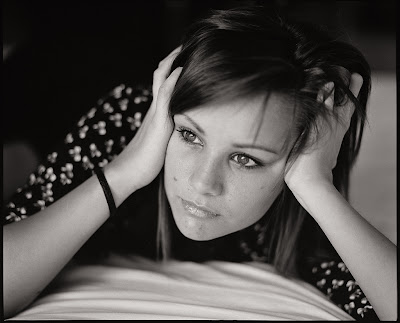
What's important here it the torsion of the body, showing the posture, laying. Notice that I cropped the head a lot, in order to be closer to the eyes (my key focus point here). I left a lot of space on top since this is about the posture, and a lot of space to the right as that where her eyes are pointing. Anything that's behind her would be useless and dilution of the subject.
Also notice that the face here is placed more or less at the crossroad between third lines.

Last but not least for this Part 1 or the portraiture guide : when you travel, and your lovely lady is in front of the Eiffel tower, don't try to get a good portrait and a good architecture picture at the same time. You'll end up with that, and it's not worth buying an expensive DSLR:


No offense to the lovely couple (no idea who they are)

This is neither a portrait, nor a good Eiffel tower picture. You shoot digital? Then you can shoot plenty, so pick your fights. First shoot a portrait, then shoot the tower :), and you'll end up with something like this :

Notice that the eyes are on the top third line, not mid picture


You instead have two picture of your trip to Paris, each with a purpose, each quality pictures. You could also shoot two vertical images, one of the tower, one of your beautiful girlfriend, and make a diptych out of the two.

That's it for part 1, please leave comments if you find it useful, not useful, boring, not detailled enough, or just to say hello :)